
Updated on: March 29, 2024.
There are various reasons why one might want to keep their phone number private. Whether it be for a startup business, customer service, catering clients, or new connections. It can provide an extra layer of security when sharing your number with anyone unknown, especially if your number is connected to your bank account.
If you wish to limit access to your primary number to your friends close and family only, having a secondary phone number is the best option for you. Fortunately, obtaining a secondary phone number is an easy process. Fear not, there are multiple options available to you. There are many free options available these days as well.
With TextNow, you can use a virtual U.S. phone number for privacy or specific purposes. It includes features like customizable voicemail and Wi-Fi connectivity. You can install its app on iOS and Android and also use it freely on any browser.
TextNow is a popular and cost-effective communication option for all. It was extremely easy to use this platform in merely a few steps. The steps are as follows.
1. Download and open the TextNow app or go to the TextNow website on your browser and click on the "Sign Up Free" button.
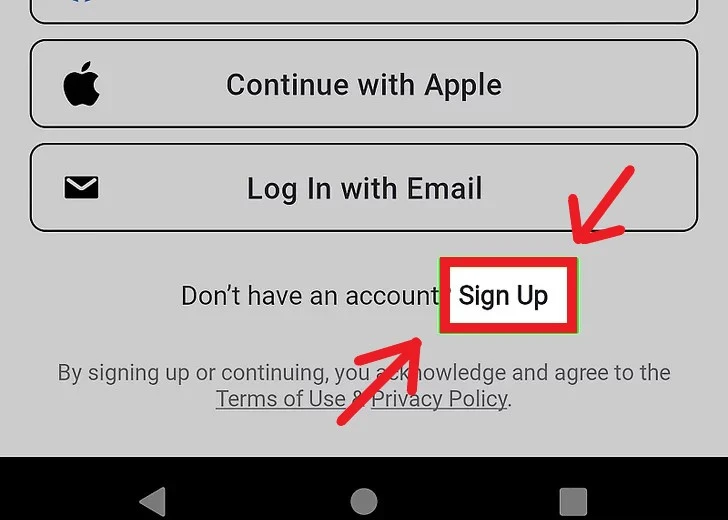
2. Fill in with your email address and create a password to register for an account.
3. Once you have signed up, TextNow will prompt you to choose your area code and select a phone number from the list of available options.
4. Choose the phone number you want and click on the "Continue" button. You can also search for a specific phone number by entering a keyword in the search bar.
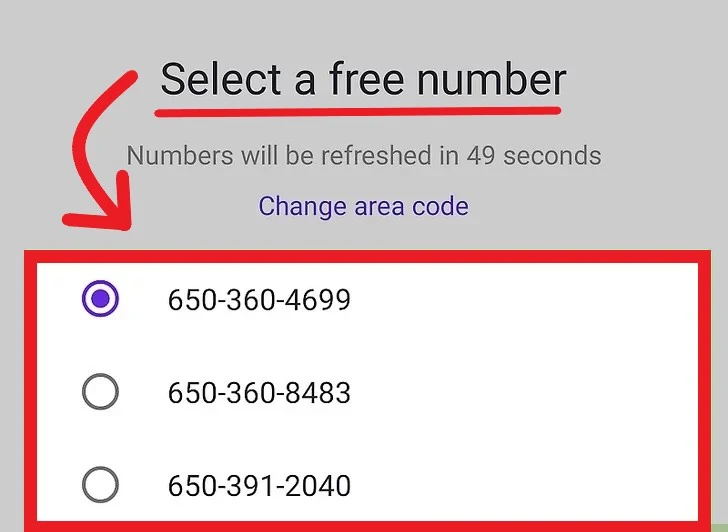
5. Verify your account by entering the confirmation code sent to your email address or phone number and activate it from the main menu.
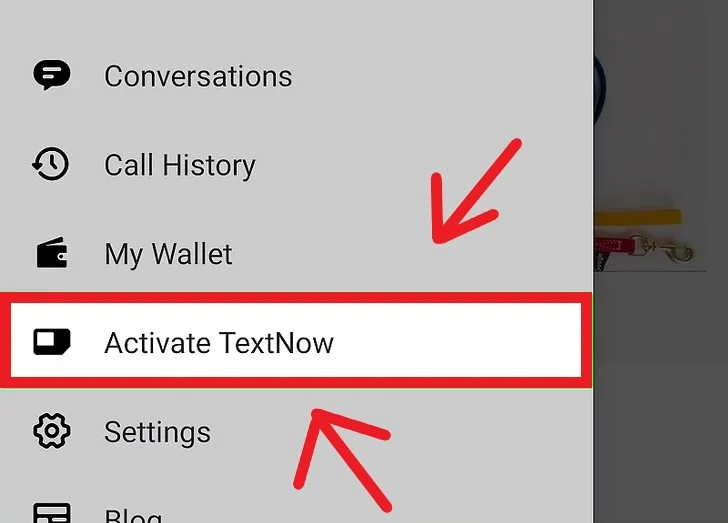
Once your account is verified, you can use your new TextNow phone number to send and receive texts, make and receive calls, and use it for various online services that require a phone number.
Moreover, Talkatone provides an ad-supported and premium subscription service for users to remove ads and access additional features such as voicemail transcription. Follow the following step-by-step instructions and install the app with ease.
1. Start by downloading “Talkatone” from your App Store or Google Play and begin by opening the application.

2. Sign in with your preferred method and you will see a U.S. number pop up.

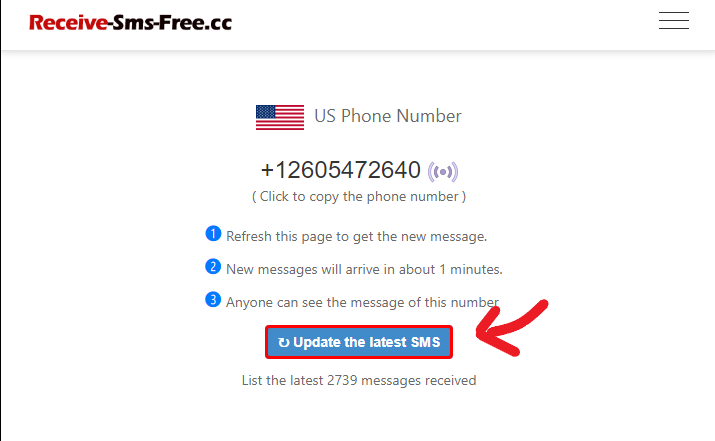
2. Once you have selected a number of your choice, there will be a waiting period of approximately 60 seconds.
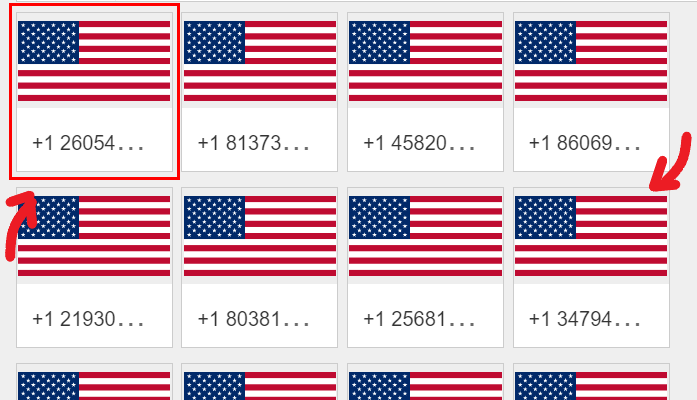
3. After that, you can refresh the webpage to view the latest text messages received to your chosen number for any verification process.
However, privacy concerns have led many individuals to seek alternative methods to use WhatsApp without disclosing their primary phone number. Fortunately, there are solutions available that allow the user to maintain their privacy while enjoying the functionality of WhatsApp.
With the help of the following app, individuals can communicate seamlessly on the platform without compromising their personal information.
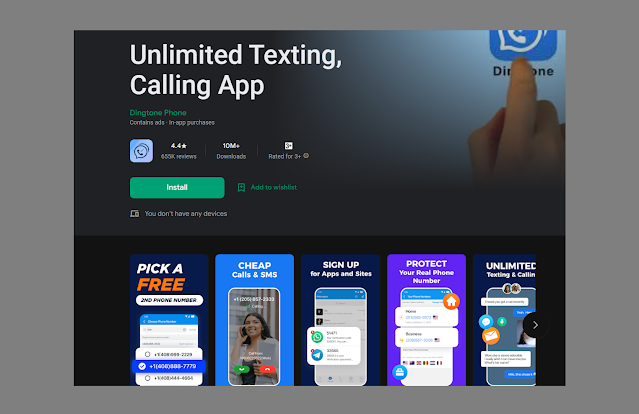
2. Find and click on Connect icon then 'Get Your First Phone Number'.
Setting up Google Voice is simple: all you need is a Google account to get started on your computer, follow these step-by-step instructions:
1. Open any web browser on your desktop or computer and go to the Google Voice website.
2. Click on the "For Personal Use" option to proceed with setting up a personal Google Voice account.
3. Sign in to your Google account. If you don't have one, you can always make a new free account by clicking on the "Create account" link. Once you're signed in, click on the "Continue" button to proceed.
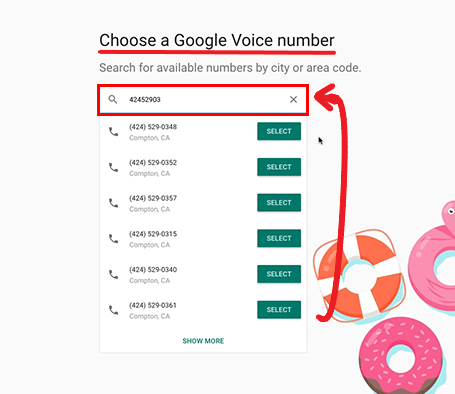
4. On the next screen, you'll be prompted to "Choose a phone number." Enter your desired area code or location in the search box, and Google Voice will display available phone number options. Browse through the available phone numbers and select the one you prefer by clicking on the "Select" button next to it.
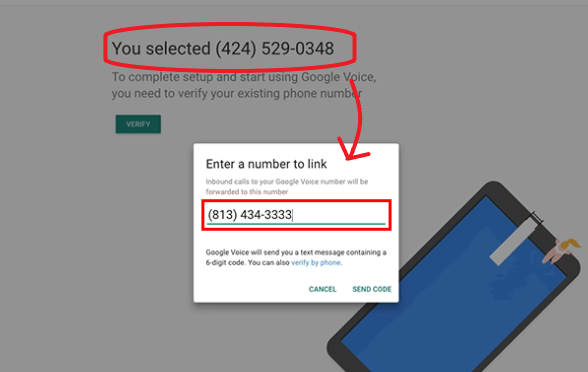
5. Click on the "Verify" button to verify your existing U.S. phone number. Google Voice will send a verification code to that number via text message or phone call. Enter the verification code you received in the provided field on the Google Voice website. Once the verification is successful, you'll be able to link your new Google Voice number with your existing phone number or Google account.
6. Follow the prompts to set up voicemail and customize your Google Voice settings according to your preferences. After that, you will have a free U.S. phone number through Google Voice that you can use for domestic calls.
Here are the Android and iOS instructions for setting up Google Voice on your smartphone:
1. Download the Google Voice app from the Google Play Store or the App Store to your phone.
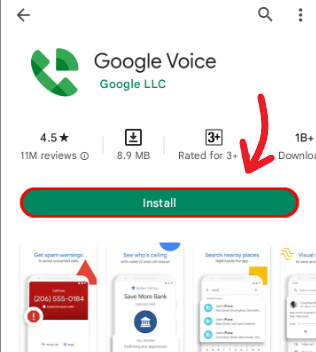
2. Open the app and sign in with your Google account credentials.
3. Follow the prompts to choose a new Google Voice number or use your existing number and enter your area code or city to search for available numbers.
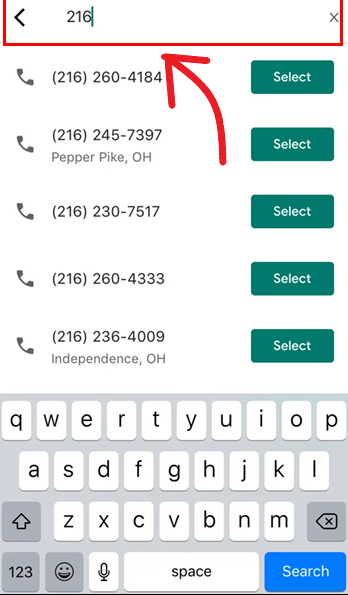
4. Choose a number from the list of available options, then tap "Select."
5. Verify your existing phone number by entering it in the app and following the prompts. Google will send a verification code via text or phone call.
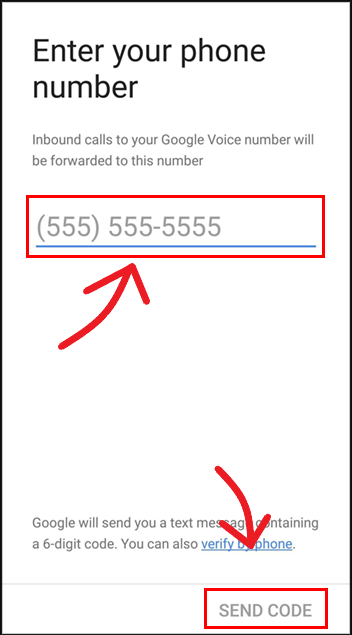
6. Enter the verification code when prompted in the app to complete the setup process and begin using Google Voice to make and receive calls and texts from your new U.S. phone number.
As the name suggests, individuals can seamlessly exchange text messages free of cost with this app. Textfree effectively serves as a shield and maintains confidentiality while engaging in communication.
1. Download the Textfree app, open the app, and sign up.
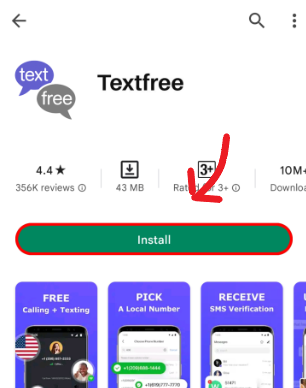
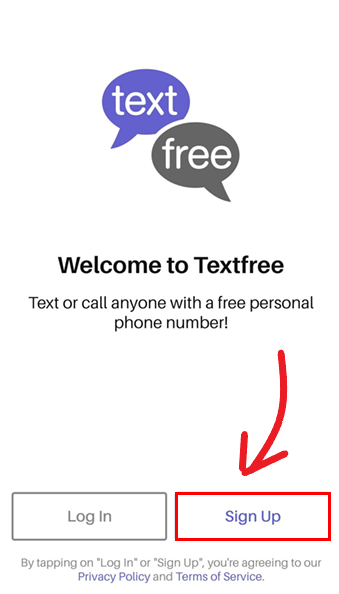
2. Select an area code and choose a phone number from the available options.
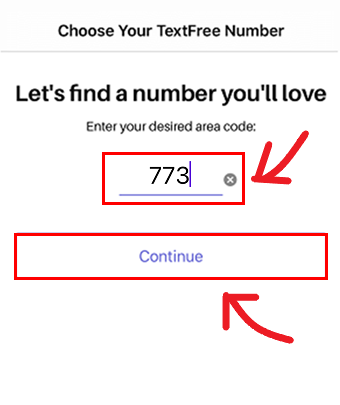
3. Create a username and password.
4. Provide a valid email address and verify your email address, if required.
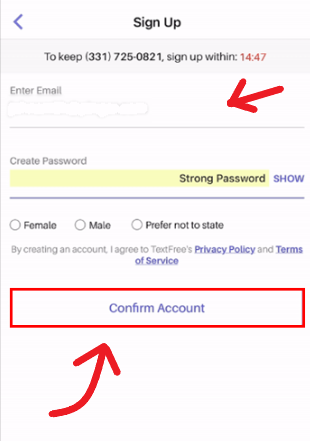
Now, you will be signed up for Textfree and be able to begin using it to send and receive text messages with your new phone number.
This post was brought you by in collaboration with Myspy one of the best android parental control app.
Read next: Need Verification? The Best 9 Applications to Get a Second Number
This post previously detailed using Express Talk for a landline number, now outdated. Updated with current free US options.
There are various reasons why one might want to keep their phone number private. Whether it be for a startup business, customer service, catering clients, or new connections. It can provide an extra layer of security when sharing your number with anyone unknown, especially if your number is connected to your bank account.
If you wish to limit access to your primary number to your friends close and family only, having a secondary phone number is the best option for you. Fortunately, obtaining a secondary phone number is an easy process. Fear not, there are multiple options available to you. There are many free options available these days as well.

Free U.S Numbers to Maintain Privacy

TextNow
TextNow is a free communication service where you can send and receive messages, you can also make calls, and use voicemail. It offers a browser-based platform and also a mobile app for convenient access.With TextNow, you can use a virtual U.S. phone number for privacy or specific purposes. It includes features like customizable voicemail and Wi-Fi connectivity. You can install its app on iOS and Android and also use it freely on any browser.
TextNow is a popular and cost-effective communication option for all. It was extremely easy to use this platform in merely a few steps. The steps are as follows.
1. Download and open the TextNow app or go to the TextNow website on your browser and click on the "Sign Up Free" button.
2. Fill in with your email address and create a password to register for an account.
3. Once you have signed up, TextNow will prompt you to choose your area code and select a phone number from the list of available options.
4. Choose the phone number you want and click on the "Continue" button. You can also search for a specific phone number by entering a keyword in the search bar.
5. Verify your account by entering the confirmation code sent to your email address or phone number and activate it from the main menu.
Once your account is verified, you can use your new TextNow phone number to send and receive texts, make and receive calls, and use it for various online services that require a phone number.
Talkatone
Talkatone is a mobile application that allows users to make free phone calls, send texts, and share multimedia messages with other Talkatone users and provides traditional phone numbers in the United States and Canada. The app is available for download on App Store and Google Play both. It also offers a secondary phone number that can be used for personal or business purposes and can be accessed from any device.Moreover, Talkatone provides an ad-supported and premium subscription service for users to remove ads and access additional features such as voicemail transcription. Follow the following step-by-step instructions and install the app with ease.
1. Start by downloading “Talkatone” from your App Store or Google Play and begin by opening the application.
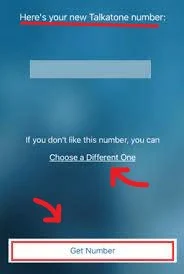
2. Sign in with your preferred method and you will see a U.S. number pop up.
3. Select the number or select a different one by tapping on the “choose a different one” option and you will have your very own secondary U.S. number for calls and texts.
You can now receive text messages on websites to resolve these privacy concerns and also be able to verify on apps and websites without having to put your phone number at risk.
1. By visiting the website on any browser, you will be shown a list of available U.S. phone numbers that they can choose a number from and use for services or apps that require a verification code.
Free U.S. Number for Verification
It is very common to face a verification code requirement on apps and websites. Verification codes serve the purpose of confirming the identity of the user but often one doesn’t want to use their numbers for this purpose. Now, there are ways around this to aid the ones with privacy concerns.You can now receive text messages on websites to resolve these privacy concerns and also be able to verify on apps and websites without having to put your phone number at risk.
Receive-SMS-Free.cc
Receive-SMS-Free.cc is a bypass service that provides a convenient solution to avoid sharing their primary phone number for verification purposes. The service offers a selection of free U.S. phone numbers that users can utilize to receive verification codes temporarily without compromising their privacy. The service is straightforward to use, and users can quickly obtain a number by simply clicking on their preferred option and following the step-by-step guide below.1. By visiting the website on any browser, you will be shown a list of available U.S. phone numbers that they can choose a number from and use for services or apps that require a verification code.
2. Once you have selected a number of your choice, there will be a waiting period of approximately 60 seconds.
3. After that, you can refresh the webpage to view the latest text messages received to your chosen number for any verification process.
WhatsApp Compatible (Paid) U.S. Number
When it comes to using one of the world's most popular messaging apps; WhatsApp, sharing your phone number is typically a requirement for operating the app. You can send and receive text messages, audio and video calls, and multimedia on this app free of cost.However, privacy concerns have led many individuals to seek alternative methods to use WhatsApp without disclosing their primary phone number. Fortunately, there are solutions available that allow the user to maintain their privacy while enjoying the functionality of WhatsApp.
With the help of the following app, individuals can communicate seamlessly on the platform without compromising their personal information.
1. Download Dingtone on your device and create an account.
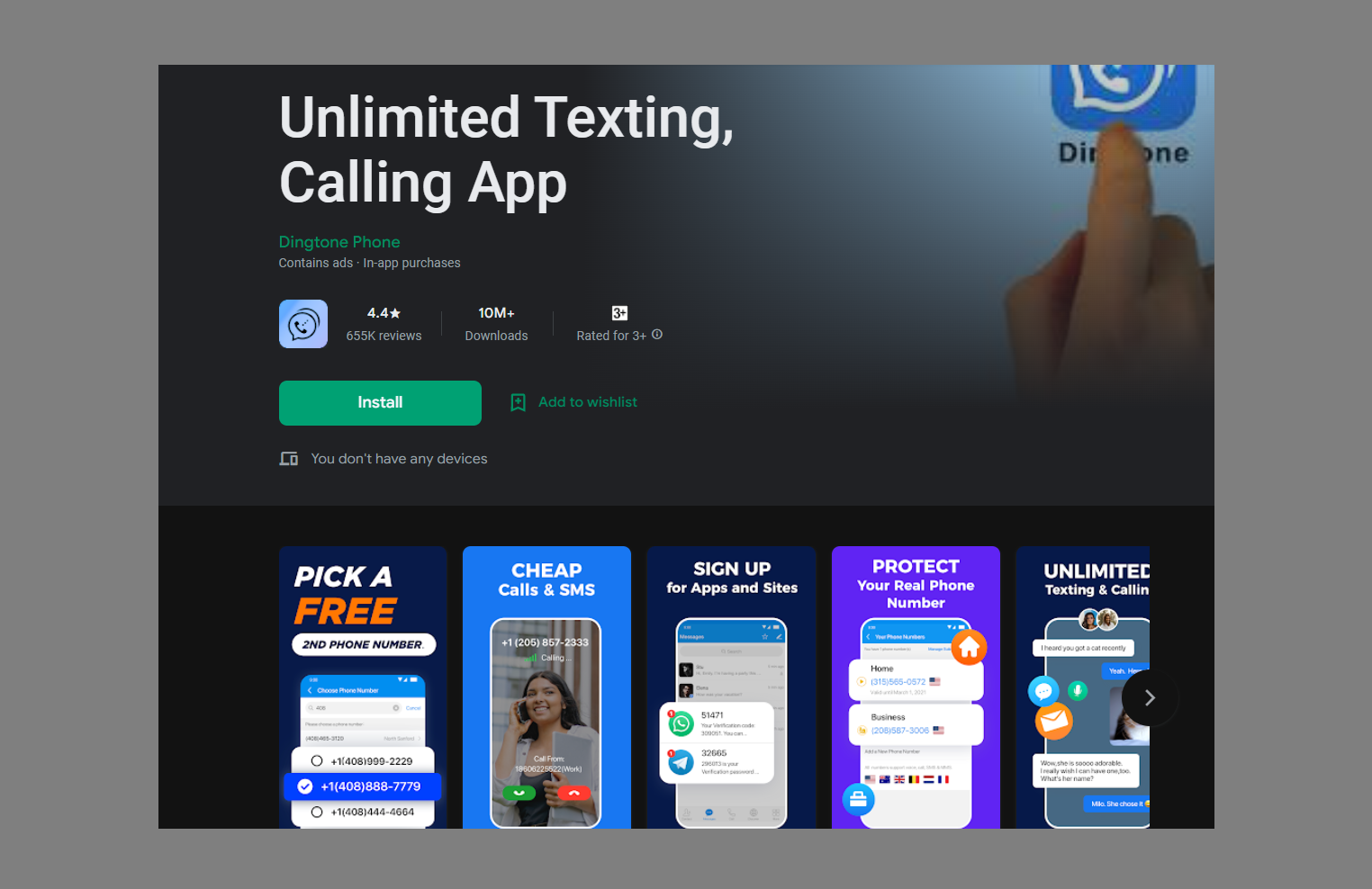
2. Find and click on Connect icon then 'Get Your First Phone Number'.
3. Select your desired phone number and pay the fees.
4. Now you can sign up for WhatsApp, Instagram, Google or Facebook with your Dingtone number.
A U.S. Number Free-of-cost
Google Voice
When it comes to popular and widely used services, Google is at the forefront with its search engine and Gmail platform. Another valuable offering from the tech giant is Google Voice, it is a free service that allows you to obtain a U.S. phone number for making domestic calls, accessible through both web browsers and smartphones.Setting up Google Voice is simple: all you need is a Google account to get started on your computer, follow these step-by-step instructions:
1. Open any web browser on your desktop or computer and go to the Google Voice website.
2. Click on the "For Personal Use" option to proceed with setting up a personal Google Voice account.
3. Sign in to your Google account. If you don't have one, you can always make a new free account by clicking on the "Create account" link. Once you're signed in, click on the "Continue" button to proceed.
4. On the next screen, you'll be prompted to "Choose a phone number." Enter your desired area code or location in the search box, and Google Voice will display available phone number options. Browse through the available phone numbers and select the one you prefer by clicking on the "Select" button next to it.
5. Click on the "Verify" button to verify your existing U.S. phone number. Google Voice will send a verification code to that number via text message or phone call. Enter the verification code you received in the provided field on the Google Voice website. Once the verification is successful, you'll be able to link your new Google Voice number with your existing phone number or Google account.
6. Follow the prompts to set up voicemail and customize your Google Voice settings according to your preferences. After that, you will have a free U.S. phone number through Google Voice that you can use for domestic calls.
Here are the Android and iOS instructions for setting up Google Voice on your smartphone:
1. Download the Google Voice app from the Google Play Store or the App Store to your phone.
2. Open the app and sign in with your Google account credentials.
3. Follow the prompts to choose a new Google Voice number or use your existing number and enter your area code or city to search for available numbers.
4. Choose a number from the list of available options, then tap "Select."
5. Verify your existing phone number by entering it in the app and following the prompts. Google will send a verification code via text or phone call.
6. Enter the verification code when prompted in the app to complete the setup process and begin using Google Voice to make and receive calls and texts from your new U.S. phone number.
Get yourself a Free U.S. Number to Text on!
Obtaining a free U.S. number for text messages is a popular choice for individuals seeking added privacy and control over their communications. In certain instances, you may prefer to keep your phone number concealed from those you interact with.Textfree
Textfree is an excellent application that caters to the need for a free U.S. number while ensuring privacy. With Textfree, users have the option to select a phone number from a variety of available choices based on their preferred location.As the name suggests, individuals can seamlessly exchange text messages free of cost with this app. Textfree effectively serves as a shield and maintains confidentiality while engaging in communication.
1. Download the Textfree app, open the app, and sign up.
2. Select an area code and choose a phone number from the available options.
3. Create a username and password.
4. Provide a valid email address and verify your email address, if required.
Now, you will be signed up for Textfree and be able to begin using it to send and receive text messages with your new phone number.
Protecting Your Privacy: The Benefits of a Secondary Phone Number
Using a secondary or virtual phone number offers a valuable solution for maintaining your privacy when making calls or sending texts. Apps like Google Voice and Primo, compatible with both iPhone and Android devices, allow you to safeguard your primary number without any cost. Safely communicate while keeping your personal information secure.This post was brought you by in collaboration with Myspy one of the best android parental control app.
Read next: Need Verification? The Best 9 Applications to Get a Second Number

Hi, Thanks for your post to verify phone numbers. Your post is very helpful to me. But I have one problem while using express talk. I registered and get phone number. I can receive call for that number. But after i trying another number i coudln't receive call. But the first registered number could use anytime. Why i can't use second number..plz help me..Plz reply to my mail smartdhana3@gmail.com
ReplyDeleteHello, @Smartway I have sent you an e-mail. For further help you can ask any question directly to NCH express talk support center :
Deletehttp://www.nch.com.au/talk/support.html
Do you know any other alternate of Express Talk? As my previous version get expired and now I'm in need of another account. Looking forward to your early response. Thanks
DeleteI truly like to reading your post. Thank you so much for taking the time to share such a nice information.
ReplyDeleteHi Irfan,
ReplyDeleteI tried to register my number using Express Talk, but failed because the system couldn't connect to the server.
I used the server: callcentric.com and the ipkall number and password,
Can you let me know what may have gone wrong?
Thanks
Hello James Pereira, Can you send me the screenshots on
ReplyDeleteipadfour.blogspot.com@gmail.com
Or please check again your inputs-entries on Express call Account setup > SIP details.
Great post, however after following your instructions I was getting the following error message when dialing to my new number "your call cannot be completed due to network error 101".
ReplyDeleteI looked for it, and found the solution. In step 5, in your IPKall settings, the Host name or IP address should be in.callcentric.com instead of just callcentric.com
In Express Talk, the server name should be callcentric.com as per the instructions.
Again, great post, thank you!
Hello...
ReplyDeleteNice trick Irfan...i also got my free us number as per your described method.
Thank you, you gave easy directives, my account is now opened. i would also need that us number rings in my local phone. how do we do that.
ReplyDeleteThis is all nice, and thanks a lot,. now I have a lot of US numbers. Which works to call but... looks like that Facebook don't accept them anymore :( I did try to verify my FB account with pinger and Google and FB doesn't sent SMS. It doesn't give me any error but no SMS. When I send SMS to tht numbers from my mobile phone they receive that. Maybe we can't use this for facebook, like we can't verify Craig List account with Google since some time. What do you think?
ReplyDeleteOf course, my FB account is clean from US IP from the beggining.
I have done all this step succsessfully. Got US no. but varification call comes from gmail voice, I picked up & press 2 digit code. But they say "I dont get it. Please enter code again." I have tried many times. But it does not work. What to do ?
ReplyDeletehow can i recieve sms using this?
ReplyDeleteI hate to reply Anonymously, By the way @Anonymous : That's true that many secure websites are filtering the verification process, but I wondered that why your Google voice number Didn't get verification SMS, seems this method didn't work for you.
ReplyDelete@Roman : Dear check your verification status it seems that you've successfully verified your number.
@anjali : if you want to receive messages on this number just give your friends your number. And if you are asking for verification purpose, then simply put your number in anywhere on the internet where a phone number is required. You will receive messages.
after i redistered at ipkall. they told me there was no u.s number. what can i do?
ReplyDeleteThanks for sharing the trick Ifran...i got the number and also able to receive the calls....but problem is coming in receiving call from Google Voice & askville from Amazon.
ReplyDeleteGoogle Calls but my phone will not ring & Amazon deliver the message that not comes. Any suggestion or help..Please..?
@mayor : Please retry step-by-step, maybe you've missed something.
ReplyDelete@Indian Railways : The only solution is voice-mail or text message. Go in settings at the top right and enable voice mail and text services.
Thank you.
ReplyDeleteYour instructions are very simple and work. I am not a tech person and don't understand what the instructions mean but they work. I was searching for this solution as my google number was expiring and my actual US phone number had expired and google wanted me to reverify. I followed your instructions and within minutes I was up and working, now problems.
Thanks for sharing this post..really simple instruction to understand and i am able to verify my number with Google voice also..
ReplyDeleteThanks for your post. when i try to sign up with ipkall, this is the message i get "There are currently no numbers available." what could be the problem and what can i do?
ReplyDeletethanks - got this to work! however google voice doesnt seem to receive shorttext messages (or auto generated messages) from f.e. bank of america.
ReplyDeleteIs there a way to use the phonenumber for a text message service somehow?
tried to get a us number and i have followed all the steps but at the IPKall portal after filling the form it's now showing 'There are currently no numbers available' after clicking on i agree. please what can i do
ReplyDeleteHello Irfan Ahmad
ReplyDeleteI am facing a problem regarding phone verification. i have done almost 90% work. Problem is when i login to my google account in google voice service. I have receive call from google but when i give any area code or city name and select any number but that time show me error message. I have tried lots of time but problem is i can not selet any google number. plz help me
How can i receive a message from google for verification
ReplyDeleteHello Irfan,
ReplyDeleteI Have Done All The Steps Properly,
but I dont understand the express talk part.
I have put the Server as :
callcenric.com
Username as my Callcentric Number
Password as my Callcentric Password
but it says ' STUN server failed ?
Please help.
@Top rider retry and again follow the steps.
DeleteHi if anyone got 407 error then try this
ReplyDeletefirst disable your firewall
or add exception of callcentric to your firewall
Thank you for you suggestion.
DeleteHey Irfan You rock man! aala, Rocking, AWESOME.. !! You just saved me 10$ a month I was about to buy subscription from Skype.. Thumbs Up!
ReplyDeleteadd me on skype: adn.cesar
Hi Irfan
ReplyDeleteOkay so i have done everything you have asked. I have an US number and its registered on Call centric.
However i am not getting any text verifications?
Also.. i tried to download google voice... but i dont have the option to pick a gooogle number.
Any help would be great. I am not that tech savy!
Hi Ifran and thanks for sharing.
ReplyDeleteI tried all 3 tricks,but -
Pinger doesn't receive texts from facebook verification.
Express talk - where do I see incoming text messages? Can't find them anywhere...
Google voice - doesn't allow the option to get a number from my location.
TNX, T.
Hi,
ReplyDeleteI try to create an account at pinger.com as i want to sign up for Craiglist US and need a phone verification for this
I am anable to sign up, I get the same error all the time .. see below
Invalid account detected [accountId: 460253738]
Can you help me out with this, I am from outside the US
Hi Irfan, Thanks for the instructions! Everything went on smoothly only until the very end. When I select the phone number from google voice after code verification, I get the message "There was an error with your request. Please try again!". No matter how many times I try with different numbers, it's the same result. Any idea on how to get over it?
ReplyDeletethanks so very much man...it works for me and am making use of it now...
ReplyDeletehello Irfan Ahmad.....i have done everything but my express talk is unable to find the address of server and registration attempt also failed...i used callcentric.com
ReplyDeleteas my server but it failed..please help me out..
hello Irfan Ahmad...is it possible to receive and send text messages with the US number generated from ipkall?
ReplyDeleteHi Irfan,
ReplyDeleteThanks so much to have this post to help many people.
Have followed all steps until where I download the Express Talk,(it downloads the Business edition automatically), then the dail pad phone box appear right away, I can NOT find the set up area for SIP and all others which you instruct?
Please help.
Find out setting options.
DeleteThanks for your idea... but i have a problem with this, i registered for callcentric.com, and i tried registering for ipkall but it keep telling me "Please enter a valid SIP Proxy to use." please you tell me what to do... thank you
ReplyDeleteAwesome!
ReplyDeleteWorked Great! Thank You :)
i live in muscat and want to have free USA number i tried and was succesful until installing express talk.i have downloaded the express talk and provided the info.
ReplyDeletebut this info could not be registered the message was SIp was not registered kindly guide or provide me with some other method.
thanks
Hello Dear .. How do I send or receive SMS ??
ReplyDeleteI successfully receive call from Google to using your 2nd way. And Pinger is off for this kind of call receiving I think :)
ReplyDeleteipkall no longer gives us numbers.
ReplyDeleteYou can get a U.S phone number that makes calls, receive calls and sms at usacallsms.com
I really appreciate for sharing the tutorial. I would love to get US phone number for free.
ReplyDeletePlease note everyone. Before asking any questions follow the all steps carefully.
ReplyDeleteserver in.callcentric.com did not respond to register (user sip **********) ?????
ReplyDeleteChange your server setting from (in.callcentric.com) to just (callcentric.com)
ReplyDeletehello, irfan, have been doing according to the instructions you gave but IPKall keep saying there are no numbers currently available, please what do i do right now
ReplyDeleteCan you provide screen shorts where you are filling the form? and your email?
ReplyDeleteemail screen shorts here: irfanahmad1989@gmail.com
Is there anything out there at all that will receive facebook verification codes?
ReplyDeleteThanks irfan for ur detail description , but there is still a question.
ReplyDeletethat i got a text number as u described, but when some one from us send me sms msg how can i receive that sms. i mean where because this is not my mobile number that i can see it my inbox,
so how can i check my msg ??
thanks
Gull
I create 2 text free numbers and send sms from my local mobile number to my newly crreated usa number in internatinal format like 0017754201042, but these 2 msgs not received on both pinger text free web page while i am login , and also not receive in my email inbox. I also mark email notification as on, So help me how it works for verification. Do i need to install separate app on my win 7 pc ?
ReplyDeleteThanks
Gull
Try receive sms online for free now.
ReplyDeleteFree, stable, fast, easy to use.
http://www.receivesmsnow.net/
hello, i'm Arzu kabir
ReplyDeletei know everything about this matter. i can call in usa!!! free!!!!!!!!!
my skype id arzukabir
thank ....you.... thanks... alot....brother.........
ReplyDeleteI need US phone number for one of my tech support site. Thanks for sharing this information.
ReplyDeleteI was using free UK number for long time for business purpose. Now i expanded my business to USA, so i need a free number for US too. For that i was searching for i reliable and trustworthy service that can provide free number. While searching i came across your article and i am totally convinced with Google Voice. As it is of Google service, so it's trustworthy and reliable. Thanks for sharing such a useful resource.
ReplyDeleteThanks for sharing this useful information, it just very useful and helped me lot.
ReplyDeleteHi there I would like to know if this method will work if I want to receive short code sms from Facebook or Twitter. Btw I'm not sure if google voice supports short code sms. Thanks.
ReplyDeleteI am first time user of VoIP or IPKall or SoftPhone technology. I googled and found some good posts to get 1 free US phone number.
ReplyDelete1. I register at CallCentric
2. Entered CallCentric details at IPKall (CallCentric # 177***** and callcentric.com)
3. Received email from IPKall announcing my US number.
I downloaded Express Talk and entered following details
Server: callcentric.com
SIP Number: 177727**** (Call Centric #)
Password: CallCentric and IPKall Password (Same password at both sites)
Express Talk gives error "Server callcentric.com did not respond to register (user sip.17772*****@in.callcentric.com)
Please any one help me, what I need to do more to get 1 free US number.
I need Free US number with any combination either its CallCentric/IPKall/ExpressTalk or some one else, please guide me.
Rakib this step is causing the problem : Express Talk gives error "Server callcentric.com did not respond to register (user sip.17772*****@in.callcentric.com)
DeleteJust remove "in" from the above line in "Express Talk setting" or "sip setting" the correct form is:
"17772*****@callcentric.com"
I don't understand why I don't receive code google ? help me
ReplyDeleteHi,
ReplyDeleteI have registered number of IPKall and created account on callcentric and express talk. Now I need to to know that how can I receive messages from paypal on my IPkall number ? Where can I receive texts and calls ??
Is google voice account is necessary for the above three accounts to work ? I will be very thankful if you briefly teach me these things ?
Please can I use the pinger app on a tecno phantom tab??....also is there any other app that is very similar to pinger that will work on the phantom tablet?. Hope to read from you soon.
ReplyDelete